Data analysis, Excel imports and de-duplication
This release improves how you import and clean larger and more complex spreadsheets.

Vish Varma
Co-founder, CEO
Product
Advanced data analysis
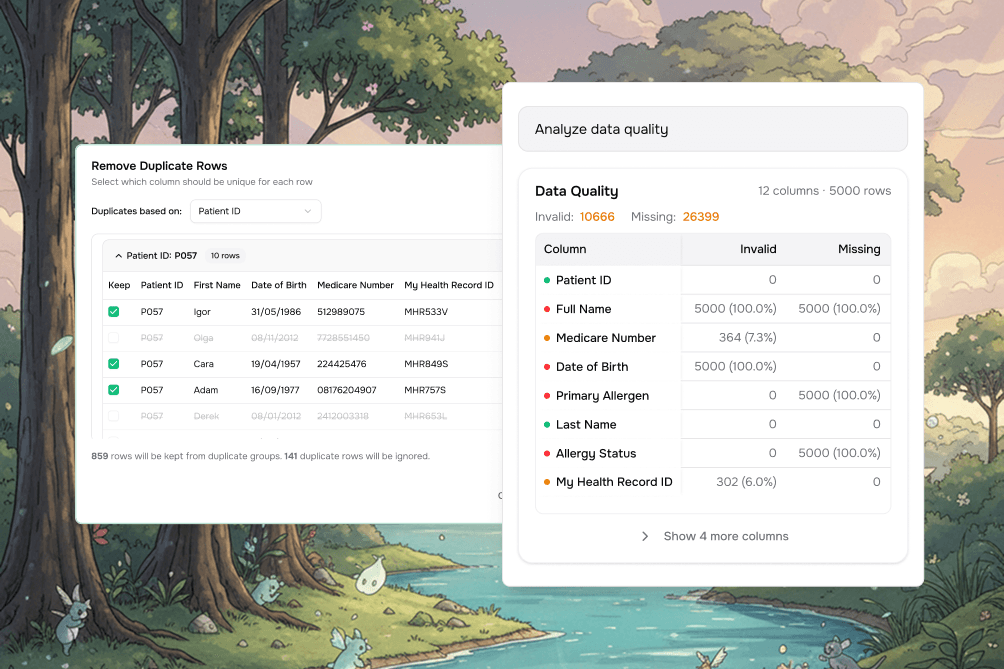
You can now analyze data quality directly in the app to catch issues early.
This includes:
Missing or invalid values
Incorrect data types
Column-by-column visibility into problem areas
This helps avoid failed imports and downstream cleanup.
Improved Excel imports
When uploading Excel files with multiple tabs, you can now select exactly which sheet to import.
You’ll also see a live preview before importing, so you know exactly how your data will be read.
For complex spreadsheets, an advanced (AI-powered) parsing option is available to handle merged cells and unusual formatting.
Clearer duplicate detection
The import flow now flags potential duplicate rows before data is added:
Matching records are highlighted
Incoming data is compared side-by-side with existing data
Issues can be reviewed before confirming the import
Other improvements & fixes
Column widths in workbooks now persist across navigation and refreshes
Long column names are truncated with tooltips during CSV mapping
Sheet names automatically stay unique when duplicates exist
Cross-sheet references validate faster and more reliably
Empty sheets now display correctly when navigating
Empty CSV files (headers only) now show a clear error
Translation lookups now return only valid matches
New accounts are automatically subscribed to product updates